Word timing
Supported tracks fill the active line as each word is sung. If a source runs early or late, global shortcuts nudge the timing without opening settings.
Synced desktop lyrics for Windows
Hum puts the current lyric above whatever you are doing, styled more like a music player than a subtitle file.
One paymentWindows 10 and 11No player login
 Paper SatellitesMira Lane
Your player can stay put
Hum listens to Windows, not one music service.


The line stays put
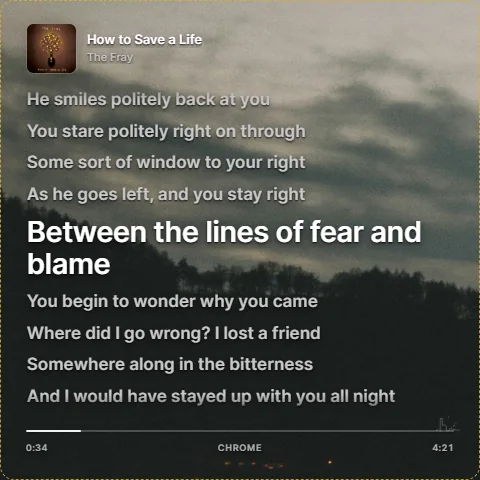
The active lyric holds the same reading position and the same type size. Earlier and upcoming lines move around it, so you can follow the song without chasing the page up and down.
Two shapes, one reading position
Square view gives the song a full visual stage. Ribbon view keeps a compact strip above your work, game, or stream controls. Switch between them from Hum settings.
Paper SatellitesMira LaneSquare view
Blurred artwork, a fixed active line, nearby lyric context, track details, and progress in one resizable window.
Built-in OBS browser source
Hum serves a clean local browser source for OBS. Add the address once, style the overlay, and let Hum follow whatever is playing.
Keep the words where I can see them
The useful parts
Hum is a small desktop app, not another music platform. It follows playback, finds the lyrics, and stays out of the way until you need the next line.
Supported tracks fill the active line as each word is sung. If a source runs early or late, global shortcuts nudge the timing without opening settings.
Move and resize the overlay in edit mode, lock it when the placement is right, or lower it into ghost mode when you only want a hint of the next line.
Hum checks the surface behind the overlay and the colors in the album art, then changes lyric contrast when a bright background would wash the words out.
Album art, song details, progress, and the source sit close enough to answer "what is this?" without turning the overlay into a full music player.
One price
Pay $19 once for Hum 1.x and use it on up to three Windows devices. If it is not right for you, ask for a full refund within 30 days.
Hum desktop license
$19
Before you install
Hum works with Spotify, YouTube Music, Apple Music and iTunes, VLC, Pandora, and most apps or browser tabs that publish playback information to Windows media controls.
No. Hum reads the playback information Windows already has, so there is no Spotify login or separate player connection to maintain.
Yes. Hum includes a local browser source made for OBS. It sends clean lyric text to OBS without capturing the desktop overlay itself.
No. Hum costs $19 once. There is no monthly bill attached to the desktop license.
Not currently. Hum is built for Windows 10 and Windows 11.
Hum looks up time coded lyrics through LRCLib. It needs an internet connection when it searches for lyrics for a new track.